1. Prepare the running order
The operator sets up the classes and sequence for the day. Separate track views keep their running orders distinct.
A real track using a shared, phone-friendly race-order board.
Meadowlarks uses RaceOrder. Its public board includes Big Track and Kids Track views, giving visitors one place to check the running order.
Open Meadowlarks’ boardThe board depends on operator updates. Between events it may show a waiting message or an earlier running order; it is not an event calendar or a guarantee that racing is underway.
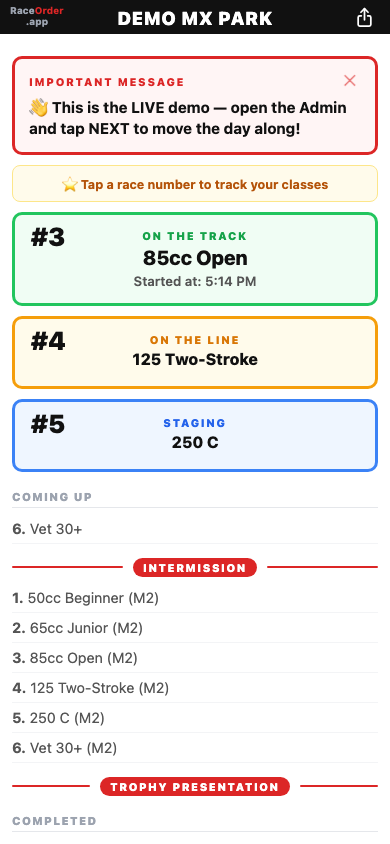
Here is how RaceOrder works. This describes the product workflow, not a claim about Meadowlarks’ staffing or measured results.
The operator sets up the classes and sequence for the day. Separate track views keep their running orders distinct.
Riders open the board link or scan its QR code on their phone. They do not need to install an app or create a rider account.
As the operator updates the running order, the board shows what is on the track, on the line and staging next.
Riders can star their classes to make them stand out. Keep following track staff instructions and official announcements.
Explore the demo before setting up your own board. Please do not use Meadowlarks’ board to test operator controls. RaceOrder is a running-order communication tool, not lap timing or results software. Opening and receiving board updates requires connectivity.